There is a function on the receiver called squelch. This is a threshold for the RF level. When the RF level is below the squelch level the receiver output is muted (this is to prevent any loud noises through your PA when the transmitter is turned off or out of range).
You will find settings for the "SQUELCH" in the "ADVANCED" menu on the receiver. You will see either the options:
- 'LOW', 'MID' and 'HIGH'
- the SQUELCH level set in dB
If the squelch level is set too high, then the RF level will not exceed the squelch level and the receiver will be muted (so you won't hear anything).
If the squelch level is set too low, then when your transmitter goes out of range or you turn it off you will hear a loud hiss through your PA.
You can see the squelch level displayed as small dots in the RF bar on the display - if the RF of both antenna is below the level of small dots then you know the receiver will be muted!
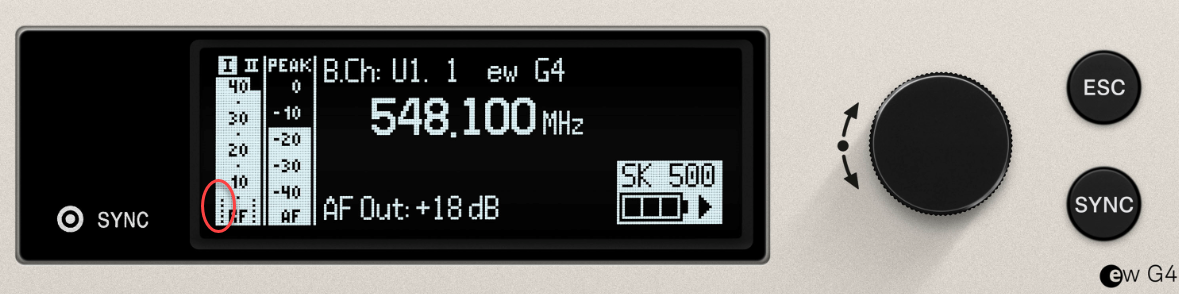
As a starting point, please set the squelch level to 'low' or around 10dB. Now test the system, both with the transmitter turned on and off - does it work as described above? If not then try adjusting the squelch up or down a level to get the desired effect.
If you find that even with the squelch level at mid or high, you still get breakthrough of noises on the system then it is most likely that frequency has some interference on and you should change to another frequency squelch is not a magic wand for bad RF, it's a safety measure!).