Your receiver has two main lights - LINK and DATA to the left side of the main window.
Below are what the different LINK colors indicate, and tips on how to resolve.
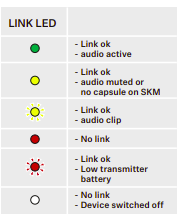
LED Colour | Link between Transmitter and Receiver | Audio Signal | Resolution |
| GREEN | linked | Active | |
| YELLOW | linked | Muted or no mic module connected on SKM-S transmitter | Check that mute lock isn't active on your receiver, and that the mute switch on your transmitter is in the green unmuted position. |
| Flashing YELLOW | linked | overdriven / clipping | Try reducing your GAIN and AF OUT levels either on your receiver directly, or in Smart Assist until you no longer see flashing. |
| RED | no link | - | Ensure your receiver and transmitter are set to the same frequency, and try re- syncing the transmitter to the receiver. |
| Flashing RED | linked / Low Battery | - | Replace or recharge the battery in your transmitter. |