Audio level control
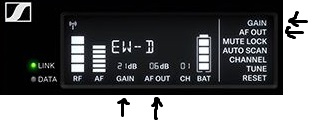
You have two aspects you can control in the overall EW D gain staging: GAIN and AF OUT.
- GAIN controls the input level coming in to the transmitter, and AF OUT controls the level leaving the receiver to your mixer, PA, amplifier, or recording set up.
- GAIN and AF OUT are both accessible in your receiver's main menu. To Control these, press the SET button on your receiver.
- Use the Up and Down arrow buttons to select the parameter you wish to control on the right side of the window.
- Press SET once highlighted, and use the Up and Down arrow keys to adjust that parameter to your liking. Press SET to save, or ESC to go back.
- The LINK LED will flash yellow if your signal is too high and overdriven.
Below are some suggested Unity Gain settings. Unity Gain refers to the level coming in (input) and level leaving (output) level being equal.
*AF Out 18 dB | Gain 27 dB
*AF Out 12 dB | Gain 33 dB
*AF Out 6 dB | Gain 39 dB