AEC, or Acoustic Echo Cancellation, can be achieved via an external channel from your DSP to the TCC 2/M's Dante Input.
It is typically implemented when a far end speaker (eg a remote caller) calls into a meeting outfitted with speakers and the TCC2 microphone (near end). As the far end participant speaks, sound from the speakers can reflect off the walls back into mic, causing an echo and delay on the return back when the far end participant is speaking.
AEC is such that it cancels room echo from the near end room (meeting room, in the case above) on the return back to the far end participant. With the Team Connect microphones, configuring an AEC channel points the microphone's beam downwards while the far end participant is speaking.
Gain staging is particularly important here, because if the speaker/output volume is set too high, the microphone will naturally pick up its output.
Optimizing Gain Structure - best practice recommendation:
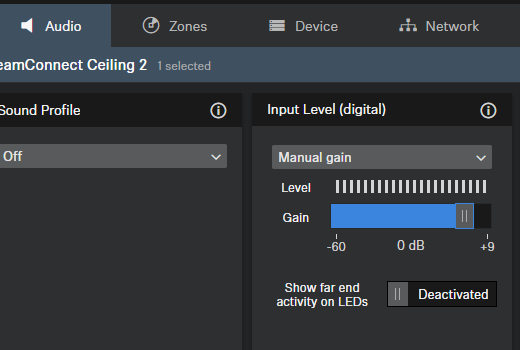
1. Adjust the Dante input level of the TeamConnect Ceiling 2 to 0 dB. This is found in the Control Cockpit on the Audio tab:
2. Start from a minimum output gain of the DSP on the reference channel so the automatic dynamic beamforming can work normally.
3. Verify this by talking in the room and observing the beam position in the Control Cockpit on the Zones tab. The far end needs to be inactive at this point.
4. Then, while the far end remains inactive, start increasing the output gain of the DSP slowly until you see the beam orientation of the TeamConnect microphone drop/toggle to 90°.
5. At this point, decrease the reference channel output gain of the DSP by 15 to 18 dB in order to get some headroom for the far end detection.
*Optionally, adjust the Dante input level of the TeamConnect Ceiling 2/M if that is more convenient than adjusting the output gain of the DSP.
In the Dante Controller software, make sure you do not route the AEC reference channel of the TCC2 to one of the TCC2 outputs, effectively creating a signal loop:
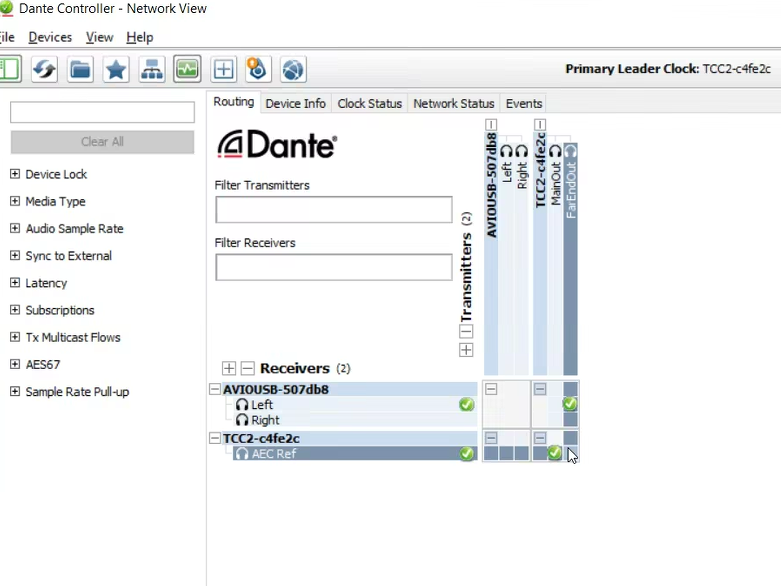
You would instead route the TCC 2's Far End Output, or the TCC M's Far End Output, to an input on your DSP.
You can then set up an external AEC reference channel from the far end/remote participant channel of your DSP (Transmitters section) to the Dante input of the TCC 2/M in Receivers section, commonly listed as AEC Ref or FarEndRef:
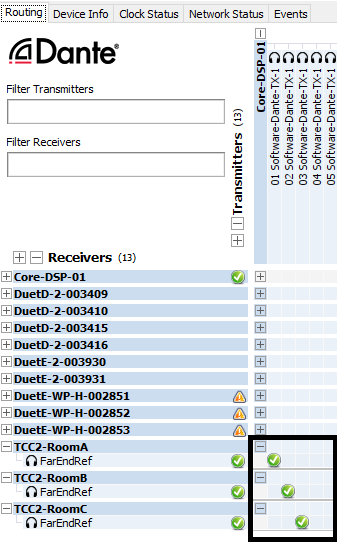
Doing this will point the beam downwards when the far end participant speaks.
Note that these steps would remain identical for the Team Connect Medium as well.
Also: AEC will not work over strictly analog configuration; it requires the Far End Reference Input channel in Dante.