The ADN-W system is operating in the 2.4GHz and 5GHz spectrum. Whilst this operates in the same spectrum as WiFi, it is not utilising traditional WiFi technology for the connection.
Poor connection or dropouts can be caused by WiFi interference. It is important to have careful planning of the use of the spectrum to ensure a reliable uninterrupted connection for the audio signals.
See more information below on:
Scanning the WiFi Spectrum:
If you are having connection issues, then a scan of the WiFi spectrum can be helpful to identify how the spectrum is being used. You should coordinate with your IT teams to ensure a coordinated use of spectrum is possible.
Once you have an idea of the WiFi channels in use, you can then configure the ADN system to make best use of free channels. The ADN-W system is supporting either Automatic or Manual channel selection for the wireless units.
WiFi coordination and avoiding interference:
WiFi is operating in the 2.4GHz and the 5GHz spectrum.
This spectrum is shared with many other users, and is often uncoordinated.
The 2.4GHz spectrum particularly can become very congested. There are several channels which can all overlap, causing cross channel interference.
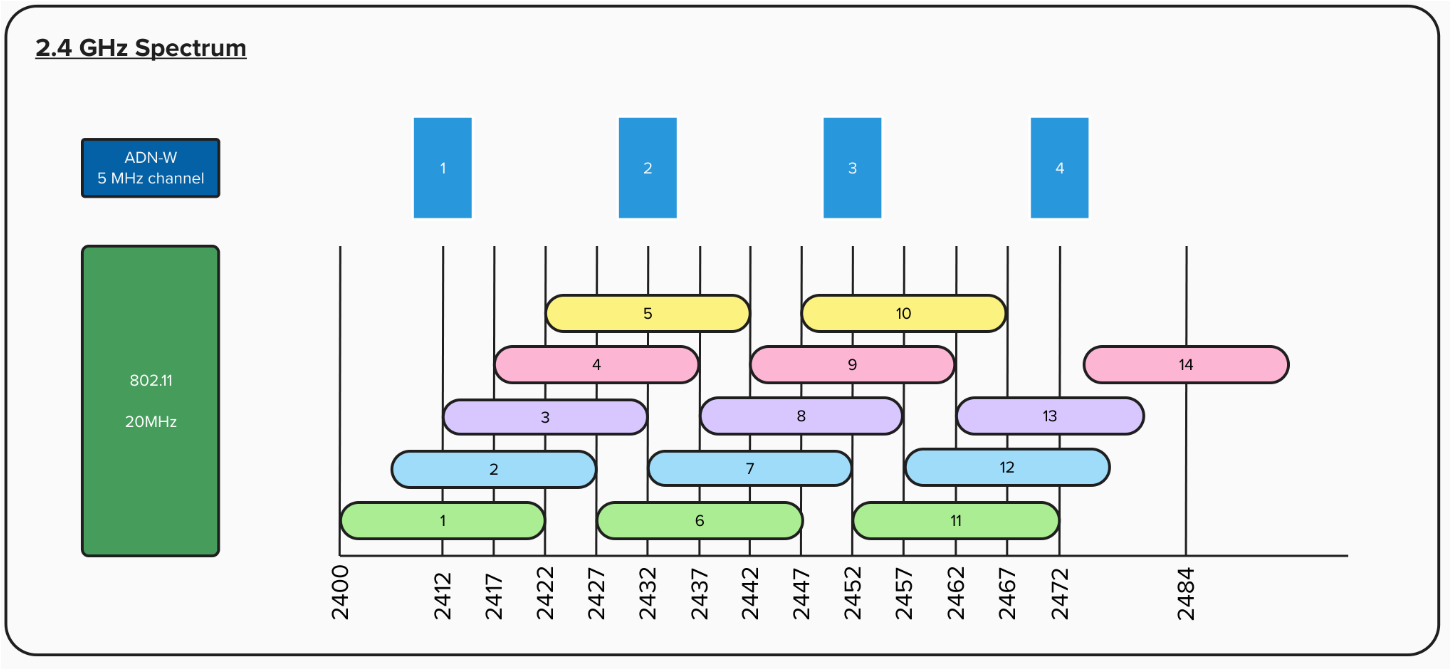
In normal WiFi scenarios it is good practice to use non-overlapping channels, for example channel 1, 6 and 11 are often considered as the most convenient channels.
Several networks can co-exist on the same channel as devices will coordinate timeslots for transmission to avoid interference.
However, with ADN systems, we recommend to run the system in a completely free channel, rather than trying to coexist with a channel used by WiFi. However, the ADN channels 1-4 which are in the 2.4GHz spectrum do not align nicely to WiFi channels 1, 6, 11, so careful consideration of the setup is required.
You should also consider that the same spectrum is shared by Bluetooth, Zigbee, and other non-WiFI devices like microwave ovens and wireless cameras or remote controls.
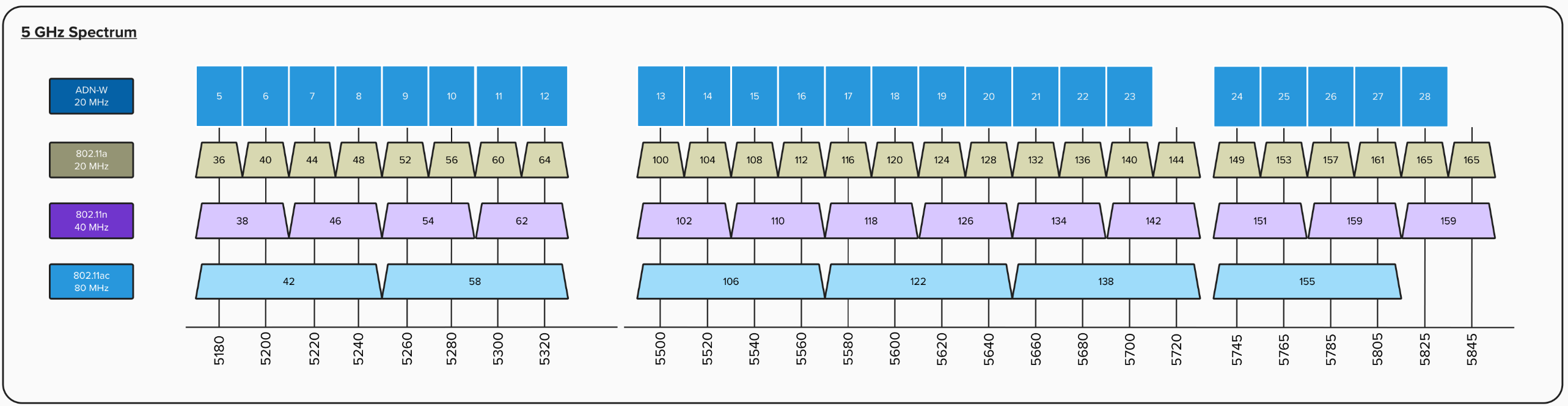
The 5GHz spectrum is usually less congested than the 2.4GHz spectrum, so it is often best to pick a channel here. In the 5GHz spectrum we more closely align to the standard WiFi channels.
Managing Dropouts:
When you experience dropouts on wireless units, this is most likely caused by WiFi interference.
The ADN system is transmitting low latency audio over a wireless connection and therefore it is important to have an uninterrupted signal. Performing WiFi scans is the most reliable way to find free spectrum for using the system.
However, be aware that the WiFi environment often changes when a room fills up with people. So what may seem like a stable system during a quiet test period, can very quickly change when the room fills up with delegates with laptops and mobile phones connecting over wifi.
There are several other things you can do to help. Below is a quick checklist for troubleshooting:
- Ensure there is good line-of-sight between the delegate units and the AW-M module
- Keep a reasonable distance between the delegate units - minimum 50cm between units is recommended
- Minimise interference from other devices - a laptop or mobile phone placed very close to a delegate unit will not help!
- Perform a WiFi scan to find free spectrum
- Coordinate your buildings WiFi, and be wary of neighbours to ensure a clean spectrum is available
- Automatic channel selection is often the best solution - but be prepared for using manual channel selection in really busy environments