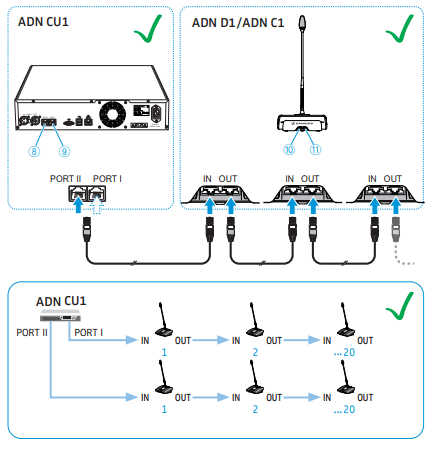
How to check for faulty cables:
If you have only one 'chain' of units connected
- Try moving the cables on the back of each unit in turn to see if a fault occurs
- If a fault occurs, replace that cable and repeat the process
If you have several 'chains' of units connected:
- Disconnect all but one chain
- Test the chain using the process described above
- Connect the next chain and repeat the process
If you have connected using 'redundant ring' topology:
- Disconnect one end of the 'redundant ring' to perform the cable tests
We strongly recommend to use only good quality, well shielded cables, with good quality connectors. Minimum specification for the cables is:
- CAT5E shielded 24AWG cable
- CAT5E shielded RJ 45 connectors
- Good quality strain reliefs
Whilst the connections utilise standard 'network' cable, the connection scheme is not using network protocol, so no network switches can be used in the connection of devices!
How to check for faulty Chairman or Delegate Units:
Faulty Chairman or Delegate units can cause errors in the system.
Troubleshooting these is similar to troubleshooting faulty cables, and can be achieved quickly via the 'half-split' fault finding process.
- When you see an error, disconnect half of the units from the chain.
- If the problem persists, disconnect half of what is still connected, and so on until you find the unit which caused the fault.
- If the problem goes away when you disconnect half the units, then you know the faulty device is in the disconnected units.
Chairman and Delegate units have a 'loop through' cabling design and must be connected via the "In" and "Out" sockets in the right order: